Implementing OIDC (with Okta)
Now that we have implemented email OTP authentication in the previous section, we can move on to implementing OpenID Connect (OIDC) authentication with Okta to allow OGP staff to authenticate using their Okta accounts.
Okta as the OIDC provider is not that commonly used in OGP applications as most of our products cater to external users instead of internal. It is used in this curriculum as the necessary OIDC credentials have been set up for learning purposes, and other providers has their own onboarding processes which is out of scope of this curriculum.
Other commonly used OIDC providers in OGP applications include:
- Singpass
- WOG Azure AD
For this section, we highly recommend taking a look at https://www.oauth.com/ before proceeding if you do not know much about OAuth. This should give you a very grounded understanding of OAuth, and would be transferrable to other OAuth implementations (eg; Singpass, SGID, etc.)
Overview
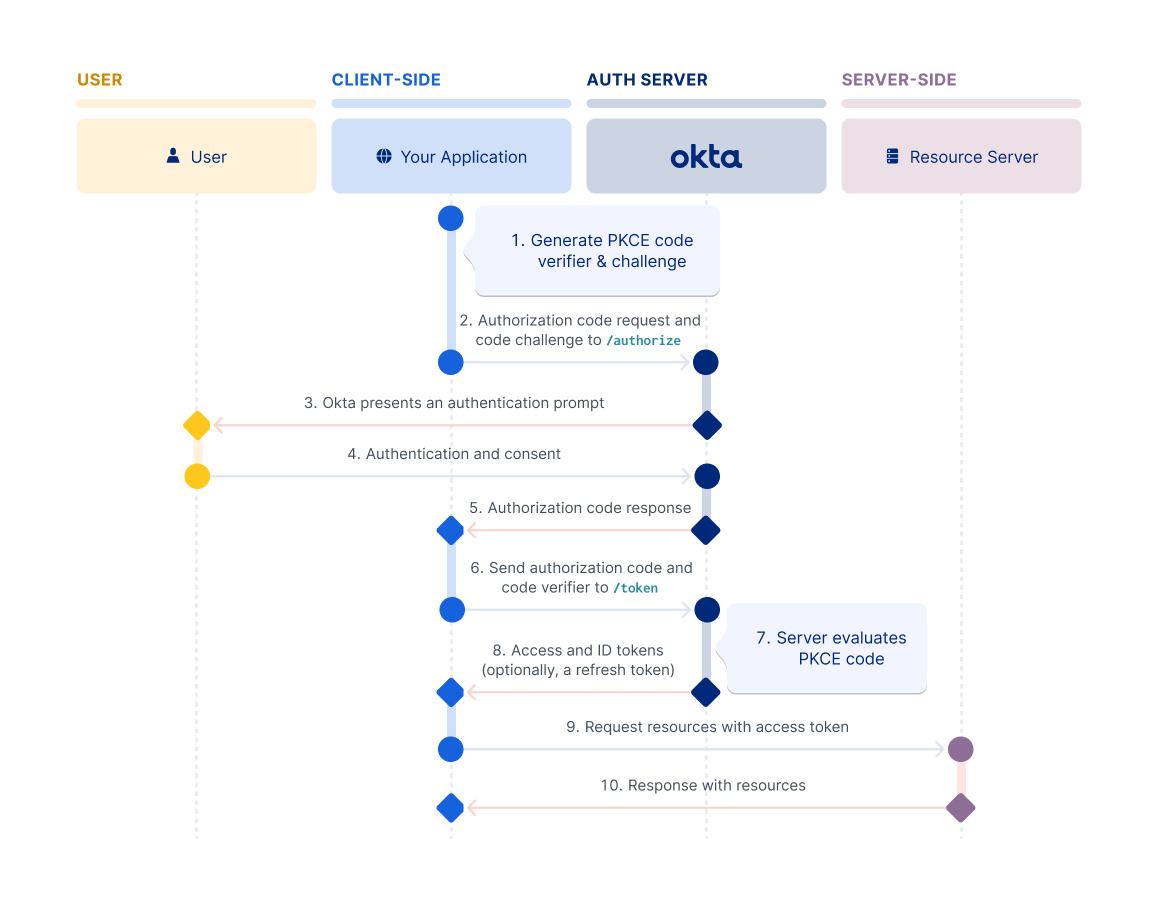
OIDC (OpenID Connect) is an authentication layer built on top of OAuth 2.0. It enables applications to verify user identity and obtain basic profile information through a standardized flow. The implementation involves:
- Authorization Request: Redirect user to identity provider (Okta)
- User Authentication: User logs in at provider
- Authorization Code: Provider redirects back with code
- Token Exchange: Exchange code for access token and ID token
- User Info Retrieval: Get user details from provider
- Session Creation: Link provider account to local user and establish session
Prerequisites
Before starting, ensure you have:
- Completed the email OTP implementation
- Okta application credentials (TODO: provide for this curriculum)
- Understanding of OAuth 2.0 authorization code flow
- Database schema supporting multiple authentication providers per user
Product Requirements Document
1. Objective
Implement OpenID Connect (OIDC) authentication with Okta as an additional authentication method, enabling users to login using their Okta credentials while reusing the multi-provider account infrastructure built for email OTP.
2. User Stories
As a user, I want to:
- Login using my Okta account without managing separate passwords
- Have my Okta account automatically linked to my existing user account if I previously logged in via email
- See a clear indication that I'm being redirected to Okta for authentication
- Be redirected back to the application after successful authentication
- Have the same authenticated experience regardless of which method I use to login
As a system administrator, I want to:
- Support multiple authentication providers (email OTP and OIDC) for the same user
- Securely store and validate OIDC state parameters to prevent CSRF attacks
- Use industry-standard OAuth 2.0 / OIDC protocols for maintainability
- Reuse existing user and account management infrastructure
- Prevent replay attacks and session hijacking
3. Functional Requirements
3.1 Database Schema Considerations
Reusing Existing Models
The database schema from email OTP implementation already supports OIDC:
- User Model: Shared across all authentication providers
- Account Model: Stores provider-specific identifiers
- For email:
provider = "email",providerAccountId = user@example.com - For Okta:
provider = "okta",providerAccountId = <okta_user_id>
- For email:
State Parameter Storage
OIDC requires storing a state parameter to prevent CSRF attacks:
- Option 1: Store in session cookie (recommended for stateless architecture)
- Option 2: Store in
VerificationTokenmodel temporarily - Format: Cryptographically random string
- Lifecycle: Created before redirect, validated on callback, deleted after use
3.2 OIDC Configuration
Environment Variables
Ensure application has the required environment variables for Okta integration, usually:
OKTA_CLIENT_ID=<your_client_id>
OKTA_CLIENT_SECRET=<your_client_secret>
OKTA_ISSUER=https://<your_domain>.okta.com/oauth2/default
OKTA_REDIRECT_URI=http://localhost:3000/api/auth/okta/callback
Scopes
You can refer to Okta's documentation for more details on what scopes are available: https://developer.okta.com/docs/api/oauth2/
Different OIDC providers may have different scopes and claims available, so always check the provider's documentation when implementing new ones.
Required scopes for Okta authentication (in our case):
openid: Required for OIDCemail: User's email address
3.3 Authorization Flow
The below flow assumes usage of the authorization code flow, which is the most secure for server-side applications. Other flows (implicit, hybrid) exist but are less secure and not recommended for this use case.
This flow also uses generic fetch calls for clarity. In practice, you may use libraries like openid-client to handle many of these steps.
Step 1: Initiate Authorization Request
You may use a variety of libraries to help with building the authorization URL and handling redirects. A commonly used library in OGP is openid-client, though some teams may prefer specific libraries depending on the OIDC provider, such as @okta/okta-auth-js for Okta and @govtechsg/singpass-myinfo-oidc-helper for Singpass.
User clicks "Login with Okta" button:
- Generate cryptographically random
stateparameter (CSRF protection) - Generate optional
nonceparameter (ID token replay protection) - Store
state(and optionallynonce) in session or database - Build authorization URL (either via a library or manually) with parameters:
client_id: Your Okta application client IDredirect_uri: Callback URL in your applicationresponse_type:code(authorization code flow)scope:openid profile emailstate: Generated state parameternonce: Generated nonce parameter (optional but recommended)
- Redirect user to authorization URL
Step 2: User Authentication at Okta
- User is redirected to Okta login page
- User enters Okta credentials
- Okta validates credentials
- User consents to share any other scope information (if any, first time only)
Step 3: Authorization Callback
Okta redirects back to your callback endpoint with:
code: Authorization code (single-use, short-lived)state: The same state parameter you sent
Validation required:
- Verify
statematches what was stored - Verify
codeis present - Delete stored
stateafter validation
Step 4: Token Exchange
Exchange authorization code for tokens:
- Make POST request to token endpoint:
- URL:
${OKTA_ISSUER}/v1/token - Method:
POST - Headers:
Content-Type: application/x-www-form-urlencodedAuthorization: Basic <base64(client_id:client_secret)>
- Body:
grant_type=authorization_codecode=<authorization_code>redirect_uri=<redirect_uri>
- URL:
- Response contains:
access_token: Used to access protected resourcesid_token: JWT containing user identity claimstoken_type: Usually "Bearer"expires_in: Token validity durationrefresh_token: (optional) For obtaining new access tokens
Step 5: Validate ID Token
The ID token is a JWT that must be validated:
- Verify signature using Okta's public keys (from JWKS endpoint)
- Verify claims:
iss(issuer): Must matchOKTA_ISSUERaud(audience): Must matchOKTA_CLIENT_IDexp(expiration): Token not expirediat(issued at): Token not issued in the futurenonce: Must match the nonce sent in authorization request (if used)
Step 6: Get User Information
Option A: Extract from ID token (faster):
- ID token contains:
sub(user ID),email,name, etc.
Option B: Call userinfo endpoint (more comprehensive):
- URL:
${OKTA_ISSUER}/v1/userinfo - Method:
GET - Headers:
Authorization: Bearer <access_token> - Response: User profile information
Step 7: Upsert User and Account
Reuse the user/account management logic from email OTP.
Step 8: Create Session
Should be identical to email OTP session creation.
3.4 API Endpoints
GET /api/auth/okta/login
- Purpose: Initiate OIDC authorization flow
- Process:
- Generate
stateparameter - Generate
nonceparameter (optional) - Store
stateandnoncein session - Save session
- Build authorization URL
- Redirect to Okta authorization endpoint
- Generate
- Session State After:
{ state: string, nonce?: string }
GET /api/auth/okta/callback
- Purpose: Handle authorization callback from Okta
- Query Parameters:
code: Authorization codestate: State parameter for CSRF protection
- Process:
- Retrieve
stateandnoncefrom session - Validate
statematches query parameter - Exchange
codefor tokens (POST to token endpoint) - Validate ID token (signature, issuer, audience, expiration, nonce)
- Extract user info from ID token or call userinfo endpoint
- Upsert user and account (in transaction)
- Clear
stateandnoncefrom session - Store user ID in session
- Save session
- Redirect to authenticated area (e.g.,
/admin)
- Retrieve
- Session State After:
{ userId: string } - Error Handling:
- Missing/invalid
state:"Invalid authentication request" - Missing
code:"Authorization failed" - Token exchange failure:
"Failed to authenticate with provider" - ID token validation failure:
"Invalid authentication response"
- Missing/invalid
3.5 Security Requirements
State Parameter
- Purpose: CSRF protection
- Generation: Cryptographically random (e.g.,
crypto.randomUUID()) - Storage: Session cookie (stateless) or database (stateful)
- Validation: Must match exactly
- Lifecycle: Single-use (deleted after validation)
Nonce Parameter
- Purpose: ID token replay attack prevention
- Generation: Cryptographically random
- Storage: Session cookie or database
- Validation: ID token's
nonceclaim must match - Lifecycle: Single-use (deleted after validation)
ID Token Validation
Must validate all security-critical claims:
- Signature: Verify using Okta's public keys (JWKS)
- Issuer (
iss): Must match configured issuer - Audience (
aud): Must match client ID - Expiration (
exp): Token not expired - Issued At (
iat): Not in the future - Nonce: Matches stored nonce (if used)
Client Secret Protection
- Never expose in client-side code
- Use environment variables
- Include in
Authorizationheader (not request body) when possible - Use Basic Auth format:
Basic <base64(client_id:client_secret)>
4. Non-Functional Requirements
4.1 Security
Must Have
- CSRF protection via state parameter
- ID token replay protection via nonce parameter
- ID token signature verification
- All OIDC claims validation
- HTTPS in production (OAuth redirect URIs must be HTTPS)
- Secure session cookies (httpOnly, secure, sameSite)
Should Have
- Token caching to reduce provider API calls
- JWKS key caching with TTL
- Rate limiting on callback endpoint
- Audit logging of authentication attempts
Nice to Have
- Support for token refresh flows
- Automatic token renewal before expiration
- Provider-specific error handling
4.2 Performance
- OIDC discovery caching (fetch once on startup)
- JWKS key caching (reduce calls to Okta)
- Token exchange: < 500ms (depends on provider)
- ID token validation: < 100ms (local operation)
4.3 Usability
- Clear "Login with Okta" button on sign-in page
- Loading state during OAuth redirect flow
- User-friendly error messages (without leaking security details)
- Automatic redirect to originally requested page after authentication
4.4 Maintainability
- Use established OIDC libraries (e.g.,
openid-client,jose) - Avoid custom crypto implementations
- Configuration via environment variables
- Provider-agnostic code structure (easy to add Singpass, Azure AD, etc.)
5. Technical Constraints
Required Technologies
The following libraries are recommended but not pre-installed. You may need to add them:
openid-client: OIDC client library for token exchange and validationjose: JWT/JWS/JWE implementation for ID token validation- Existing stack: Prisma, iron-session, Node.js crypto module
Configuration Variables
Add to .env:
OKTA_CLIENT_ID=<provided_by_instructor>
OKTA_CLIENT_SECRET=<provided_by_instructor>
OKTA_ISSUER=<provided_by_instructor>
OKTA_REDIRECT_URI=http://localhost:3000/api/auth/okta/callback
Okta Application Setup
Your Okta application must be configured with:
- Application type: Web application
- Grant types: Authorization code
- Redirect URIs: Must include your callback URL
- Scopes:
openid,profile,email
6. Architecture Patterns
Reusing Email OTP Infrastructure
The OIDC implementation should reuse:
- User Model: Same user entity across providers
- Account Model:
provider = "okta",providerAccountId = sub - Session Management: Same iron-session setup
- User/Account Upsert: Same transaction-wrapped logic
Provider Abstraction
Structure code to support multiple OIDC providers:
// Example structure
interface OIDCProvider {
  name: string;
  issuer: string;
  clientId: string;
  clientSecret: string;
  redirectUri: string;
  scopes: string[];
}

const oktaProvider: OIDCProvider = {
  name: "okta",
  issuer: env.OKTA_ISSUER,
  clientId: env.OKTA_CLIENT_ID,
  clientSecret: env.OKTA_CLIENT_SECRET,
  redirectUri: env.OKTA_REDIRECT_URI,
  scopes: ["openid", "profile", "email"],
};
This makes it easier to add Singpass, Azure AD, etc. later.
7. Security Architecture
Attack Vector Coverage
| Attack Type | Mitigation Strategy |
|---|---|
| CSRF | State parameter validation |
| Replay Attack | Nonce parameter in ID token |
| Token Tampering | ID token signature verification |
| Token Theft | Short-lived tokens + secure session cookies |
| Phishing | Rely on Okta's authentication security |
| Account Takeover | Email verification at Okta prevents unauthorized access |
| Session Hijacking | Encrypted session cookies + HTTPS |
| Authorization Code Interception | PKCE (optional, for public clients) + HTTPS |
OAuth 2.0 Security Best Practices
From RFC 6749:
- Always validate
stateparameter - Use short-lived authorization codes (Okta enforces this)
- Exchange code on server-side (never expose client secret to client)
- Validate all ID token claims
- Use HTTPS for all OAuth endpoints
- Store tokens securely (never in localStorage or accessible cookies)
8. Acceptance Criteria
User Flow
- ✅ User can click "Login with Okta" button
- ✅ User is redirected to Okta login page
- ✅ After successful Okta login, user is redirected back to application
- ✅ Session is established with user information
- ✅ User can access authenticated areas
- ✅ If user previously logged in via email, Okta account is linked to existing user
Security Validation
- ✅ State parameter prevents CSRF attacks
- ✅ Nonce parameter prevents ID token replay
- ✅ ID token signature is validated
- ✅ All ID token claims are validated
- ✅ Authorization code is single-use
- ✅ Tokens are never exposed to client-side code
Edge Cases
- ✅ User cancels Okta login: Returns to sign-in page with error message
- ✅ Invalid state parameter: Authentication fails with security error
- ✅ Expired authorization code: Token exchange fails gracefully
- ✅ Invalid ID token: Validation fails gracefully
- ✅ Network error during token exchange: User sees friendly error message
- ✅ Email from Okta doesn't exist in User table: New user created
- ✅ Email from Okta exists in User table: Account linked to existing user
Multi-Provider Support
- ✅ User with email OTP account can add Okta login
- ✅ User with Okta account can add email OTP login
- ✅ Same user entity regardless of login method
- ✅ Multiple accounts (email + okta) linked to one user
9. Out of Scope
The following are explicitly NOT included in this PRD:
- Automatic token refresh flows
- Support for multiple Okta organizations
- SAML authentication (separate protocol)
- Custom OIDC claim mapping
- Role-based access control (RBAC) from Okta groups
- Account unlinking functionality
- Admin UI for viewing linked accounts
- Singpass or Azure AD integration (similar patterns, different providers)
Success State: After implementation, you should be able to login using Okta credentials. The application should create or link accounts appropriately, and the authenticated session should work identically to email OTP authentication.
Common Pitfalls
1. Not Validating State Parameter
❌ Wrong:
// Accept callback without state validation
const { code } = query;
// Vulnerable to CSRF attacks
✅ Correct:
const { code, state } = query;
const storedState = session.oauthState;

if (!state || !storedState || state !== storedState) {
  throw new Error("Invalid state parameter");
}
2. Exposing Client Secret in Frontend
❌ Wrong:
// In client-side code
const tokenResponse = await fetch(tokenEndpoint, {
  body: JSON.stringify({
    client_secret: process.env.OKTA_CLIENT_SECRET, // DON'T DO THIS
  }),
});
✅ Correct:
// In server-side code only
const tokenResponse = await fetch(tokenEndpoint, {
  headers: {
    Authorization: `Basic ${Buffer.from(`${clientId}:${clientSecret}`).toString(
      "base64"
    )}`,
  },
});
3. Not Validating ID Token Claims
❌ Wrong:
// Decode JWT without validation
const claims = JSON.parse(atob(idToken.split(".")[1]));
// Vulnerable to token tampering
✅ Correct:
// Use library to validate signature and claims
import { jwtVerify } from "jose";

const { payload } = await jwtVerify(idToken, jwks, {
  issuer: OKTA_ISSUER,
  audience: OKTA_CLIENT_ID,
});
4. Hardcoding OIDC Endpoints
❌ Wrong:
const authUrl = "https://my-okta-domain.okta.com/oauth2/default/v1/authorize";
// Breaks if Okta changes URLs
✅ Correct:
// Fetch from discovery endpoint
const discovery = await fetch(`${issuer}/.well-known/openid-configuration`);
const { authorization_endpoint } = await discovery.json();
5. Not Using Transactions for User/Account Creation
❌ Wrong:
const user = await db.user.upsert({ ... });
const account = await db.account.create({ userId: user.id, ... });
// If account creation fails, orphaned user remains
✅ Correct:
await db.$transaction(async (tx) => {
  const user = await tx.user.upsert({ ... });
  const account = await tx.account.upsert({ userId: user.id, ... });
});
Extension Exercises
Want to practice more? Try implementing:
-
Token Refresh Flow:
- Store refresh tokens securely
- Refresh access tokens before expiration
- Handle refresh token expiration
-
PKCE (Proof Key for Code Exchange):
- Generate code verifier and challenge
- More secure for public clients
- Recommended for all OAuth flows
-
Multiple OIDC Providers:
- Add Singpass or Azure AD
- Abstract common OIDC logic
- Provider selection UI
-
Account Management UI:
- View linked accounts
- Unlink accounts
- Set primary authentication method
Testing Your Implementation
Test the OIDC implementation thoroughly:
pnpm test
Manual Testing Checklist
- Click "Login with Okta" redirects to Okta
- Enter Okta credentials successfully logs in
- User session is created correctly
- Can access authenticated pages
- Logout works correctly
- Invalid state parameter is rejected
- Network errors are handled gracefully
- Existing email users can add Okta login
- New Okta users create new accounts
Summary
You should have now implemented a production-ready OIDC authentication system with:
- ✅ Authorization code flow with Okta
- ✅ CSRF protection via state parameter
- ✅ Replay protection via nonce parameter
- ✅ ID token signature and claims validation
- ✅ Multi-provider account linking
- ✅ Secure token exchange on server-side
- ✅ Reuse of existing user/account infrastructure
This pattern is used across many OGP applications for integrating with Singpass, Azure AD, and other OIDC providers. The core flow remains the same; only the provider configuration changes.